
-3%
Adobe Acrobat Standard 2020 For Windows [Download & Serial Number]

Original price was: $299.99.$289.99Current price is: $289.99.
Delivery: Download
You will receive the official download link and key (serial number) via email within 5-30 minutes of payment.
- Description
- Support
- Reviews (0)
Description
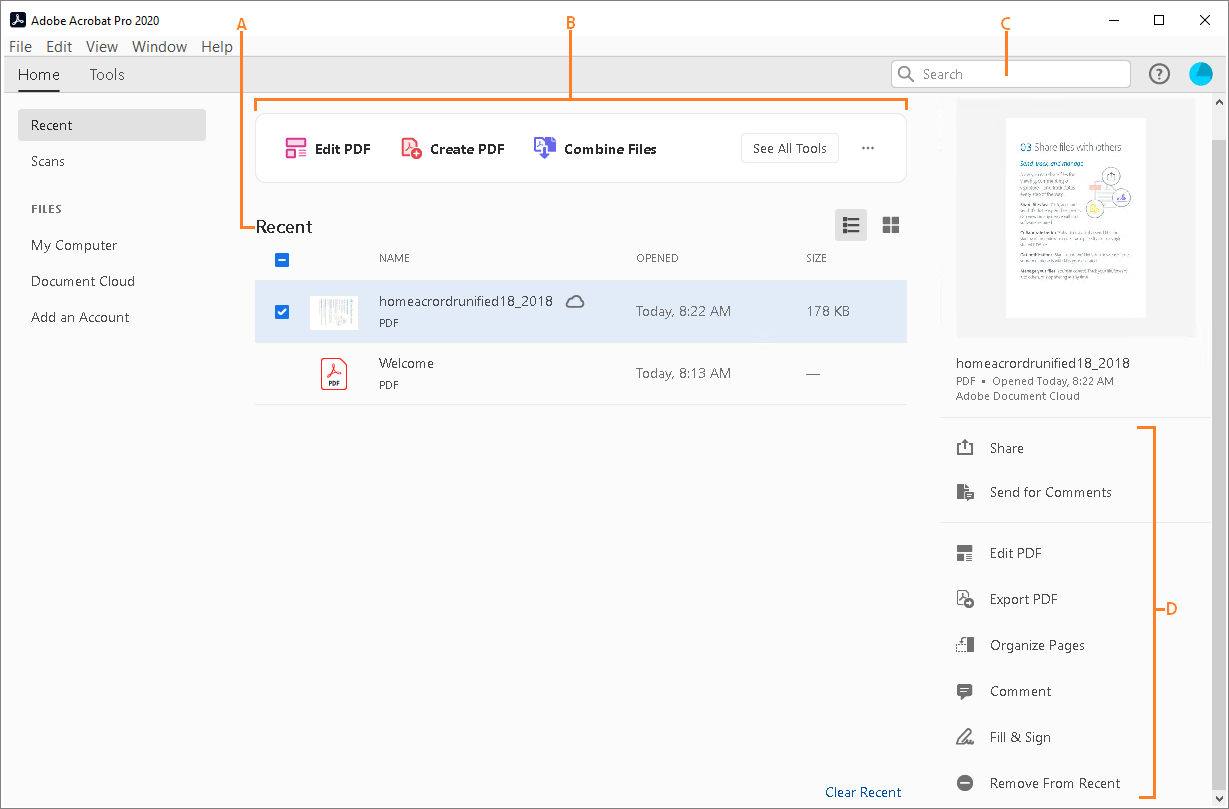
The new Home view helps you stay organized and productive – it’s a single place for you to organize, manage, and search for all your PDFs.
- Recent Files list: Displays your recent files opened for viewing from your computer, Document Cloud storage, or third-party storage like OneDrive, Dropbox, Box, and SharePoint.
- Recommended tools: Helps you discover top Acrobat tools like Edit PDF, Create PDF, Combine PDFs, and more.
- Search box: Lets you search all your Document Cloud files and the files sent or received for viewing, reviewing, or signing.
- Context pane: Helps you take actions on files across all Home view with context-sensitive menus, and check the status of participants and history of activities for shared documents.
Now you can use Adobe Acrobat 2020 and Acrobat Reader 2020 Windows and Mac desktop applications to open files protected with MIP (Microsoft Information Protection) solutions including Azure Information Protection (AIP) and Information Protection using Office 365.
Acrobat 2020 and Acrobat Reader 2020 auto-detect a MIP-protected file and prompts you to download the corresponding plug-in from the plug-in download page. Once you download and install the plug-in, the protected files open like any other PDF in Acrobat or Reader.
You can now choose your desired color to fill the PDF form and sign it using the Fill and Sign tool in Acrobat 2020. To change the color, click the Color button in the Fill & Sign toolbar.

By default, the signature’s color is black. To retain the default color, deselect the Retain Original Color For Signatures checkbox.
For more information, see Fill out your PDF form.
- Open the scanned PDF in Acrobat 2020.
- Go to Tools > Enhance Scan > Recognizable Text > In This File.
- Click Settings in the toolbar. The Recognize Text dialog box is displayed.
- In the Output drop-down list, choose Searchable Image or Searchable Image (exact) and click OK.
- Click Recognize Text in the toolbar.
- Preflight Libraries: Preflight Profiles, Fixups, and Checks are now well organized in Libraries. For more information, see Preflight Libraries (PDF | 711 KB).
- Preflight Variables: Variables allow you to dynamically adjust Profiles, Checks, and Fixups when they are applied. Variables can be used when editing Profiles, Checks, or Fixups wherever the orange triangle shows up. It is also possible to filter for existing objects using Variables.
- Preflight supports the new Ghent PDF Workgroup Specification 2015: The new GWG specifications are based on PDF/X-4, and support native transparency as well as media neutral RGB workflows.
- PDF/UA validation in Preflight: Preflight now makes it possible to fix common accessibility problems and to validate against the international standard for Universal Accessibility PDF/UA.
Improved Accessibility features in Acrobat 2020 make it easier for people with disabilities to use PDF documents and forms, with and without the aid of assistive technology software and devices.
Improved Pen tool leveraging DirectInk technology allows you to write and draw more smoothly and accurately directly on the document without selecting a tool.
New support for DirectInk in the Signatures Panel of the Certificates app offers a more natural experience and gives you more control of how your signature looks when signing on Windows 10 devices.

pls contact us if you have any problem !
pls contact us if you have any problem !
pls contact us if you have any problem !
pls contact us if you have any problem !pls contact us if you have any problem !
Reviews
| 5 star | 78% | |
| 4 star | 15% | |
| 3 star | 5% | |
| 2 star | 0% | |
| 1 star | 0% |
Only logged in customers who have purchased this product may leave a review.
![Acrobat Standard 2017 For Windows [Download & Serial Number]](https://wordpress.bytesaid.eu.org/wp-content/uploads/2025/09/acrobat_stan_win.png)
![Acrobat Pro 2017 For Mac [Download & Serial Number]](https://wordpress.bytesaid.eu.org/wp-content/uploads/2025/09/acrobat_pro_win.png)
![Adobe Acrobat Pro 2020 For Mac [Download & Serial Number]](https://wordpress.bytesaid.eu.org/wp-content/uploads/2025/09/Acrobat_pro_mac_2020-300x300.png)
![Adobe Acrobat Pro 2020 For Windows [Download & Serial Number]](https://wordpress.bytesaid.eu.org/wp-content/uploads/2025/09/Acrobat_pro_2020-300x300.png)

David Mascato (store manager) –
Installation is super easy.
Rebecca Stacey (store manager) –
Works for me. Scanned multiple genealogy journals, placed bookmarks and did what I needed it to do.
Pol Blanch Padrosa (store manager) –
The lady over the phone was very patient. Taught me a lot on installing.
Jamie Garcia-Fons (store manager) –
The only 2 differences between DC and 2017 are– 1. DC has a cloud storage.2. 2017 is permanent, you only need to pay once. So I choose 2017.
Juan jesus Bernal (store manager) –
Give the customer service a thumps up.
Karin Bokhove (store manager) –
Good program, will meet my needs.
Francisco Arahuetes (store manager) –
Nice!
Alba Fiorentino (store manager) –
Compared with other company’s product, finally chose this one.
Sergio Garcia (store manager) –
It’s very highly recommended!
Marina Zipp (store manager) –
It can help me do a lot of things. Easy to operate.
Enrique Encoy (store manager) –
ok
Myron Schellhorn (store manager) –
I want to purchase twice just want to install it on my second computer!
Joyce Stanley (store manager) –
fine
Lynda Wilcken (store manager) –
Don’t Spend A Lot Of Money/Product Works Well
Noemi Lamelza (store manager) –
chatting was very helpful with pinpointing out what I needed.
Jim Pritchard (store manager) –
I tell my friends…
Thomas Jackson (store manager) –
I am not sure until I have the product downloaded and installed.
Robert Lacey (store manager) –
Friendly website, even mor friendly prices.
kent milberger (store manager) –
Thank you for all of your help. Much appreciated
Cheryl Taets (store manager) –
Thanks
VWilliam Reese (store manager) –
It’s a pity that it can only used on one device… Have to purchase another one.
Silvia Sanchez (store manager) –
Good prices
Maria Mackin (store manager) –
Agent Sally was very helpful!
MICHAEL JASMINSKI (store manager) –
Great price and quick onlive response
john byrnside (store manager) –
They have the instruction of installing in detail, thanks for that or I would never figure out how to do
Derek Woods (store manager) –
easy and convenient to place order
Eleanor Torrisi (store manager) –
I’m not good at computer but I could easily install and use this product. Thumps up!
Delora Hura (store manager) –
Great website. Easy to use.
Teresa Thomas (store manager) –
quick and easy, so far
LAWRENCE BRANDAU (store manager) –
Useful tool for me to transfer word to pdf. My thesis can be finished in time!
Bethany Mansch (store manager) –
I was very happy to be able to buy this software – Adobe wants you to pay a monthly fee, I just want the software to buy and install. It is too expensive but it is an industry standard and you have to have it.
David Bennett (store manager) –
Good price. I do recommend to buy it.
Sandra Cisneros (store manager) –
Such a good product! I will tell my roommate to purchase one, too.
James Brewer (store manager) –
I depend on Adobe Acrobat for my home-based business. I use pdf files all of the time, and it is wonderful to be able to have additional features beyond just reading them..
Jule Hantke (store manager) –
I finally got a copy of Adobe Acrobat for use on my home laptop computer. I use my computer for work a lot and I use Adobe Acrobat for all sorts of things. I have been wanting to edit/modify PDFs on my computer and create PDFs from various graphic programs. The standard edition gives me everything basic that I need (for now).
Valeria Macchianich (store manager) –
I think this software is great because it makes it very easy to edit pdf documents. When I was sent the application form for my university, I did not just print it out, fill it in by hand and send it back. No, I was able to fill in the information right on my computer, which looked way more professional. Furthermore, I didn’t need to scan the document, as it never left my computer anyway. I can definitely recommend it.
Demi Martin (store manager) –
I really need this product. The price of this website is the most fortable one!
Lucille Quattrucci (store manager) –
A Great Price and download with ½ hour was great.