
-7%
Adobe Acrobat Pro 2020 For Windows [Download & Serial Number]
Original price was: $449.99.$419.99Current price is: $419.99.
Delivery: Download
You will receive the official download link and key (serial number) via email within 5-30 minutes of payment.
- Description
- Support
- Reviews (0)
Description
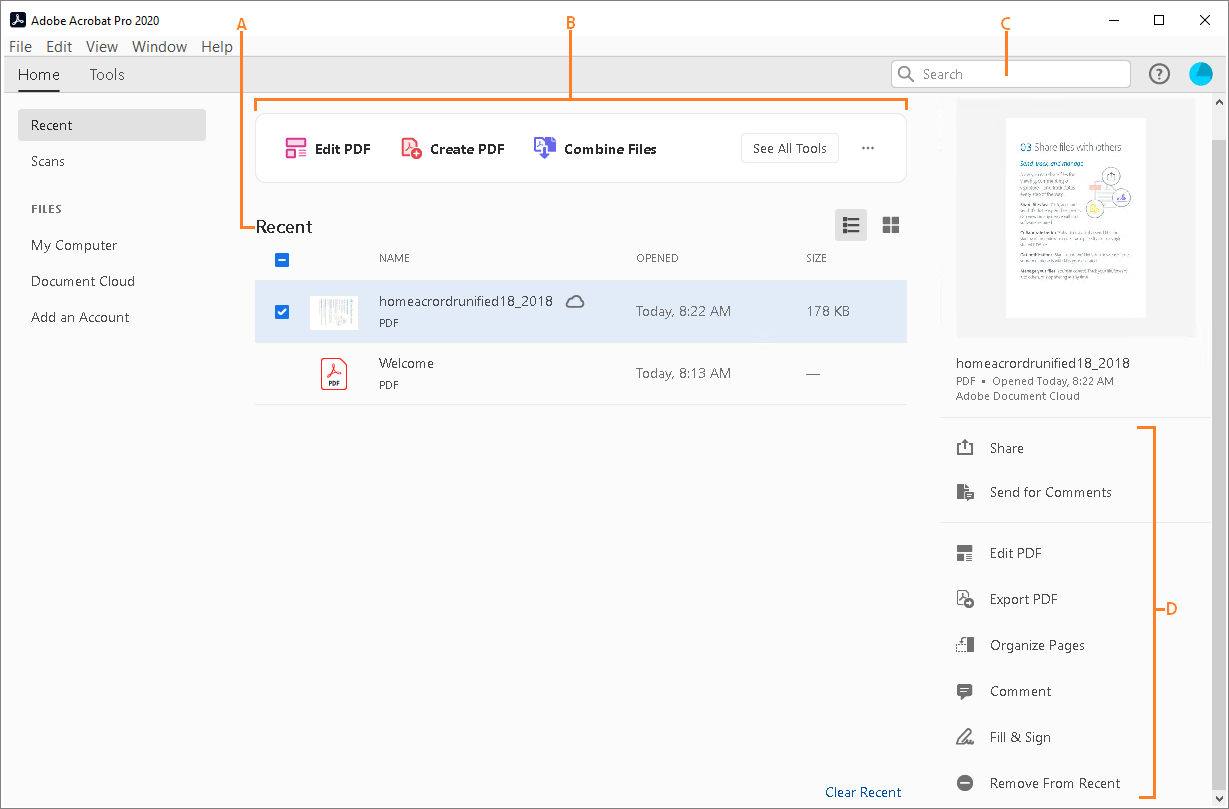
The new Home view helps you stay organized and productive – it’s a single place for you to organize, manage, and search for all your PDFs.
- Recent Files list: Displays your recent files opened for viewing from your computer, Document Cloud storage, or third-party storage like OneDrive, Dropbox, Box, and SharePoint.
- Recommended tools: Helps you discover top Acrobat tools like Edit PDF, Create PDF, Combine PDFs, and more.
- Search box: Lets you search all your Document Cloud files and the files sent or received for viewing, reviewing, or signing.
- Context pane: Helps you take actions on files across all Home view with context-sensitive menus, and check the status of participants and history of activities for shared documents.
Now you can use Adobe Acrobat 2020 and Acrobat Reader 2020 Windows and Mac desktop applications to open files protected with MIP (Microsoft Information Protection) solutions including Azure Information Protection (AIP) and Information Protection using Office 365.
Acrobat 2020 and Acrobat Reader 2020 auto-detect a MIP-protected file and prompts you to download the corresponding plug-in from the plug-in download page. Once you download and install the plug-in, the protected files open like any other PDF in Acrobat or Reader.
You can now choose your desired color to fill the PDF form and sign it using the Fill and Sign tool in Acrobat 2020. To change the color, click the Color button in the Fill & Sign toolbar.

By default, the signature’s color is black. To retain the default color, deselect the Retain Original Color For Signatures checkbox.
For more information, see Fill out your PDF form.
- Open the scanned PDF in Acrobat 2020.
- Go to Tools > Enhance Scan > Recognizable Text > In This File.
- Click Settings in the toolbar. The Recognize Text dialog box is displayed.
- In the Output drop-down list, choose Searchable Image or Searchable Image (exact) and click OK.
- Click Recognize Text in the toolbar.
- Preflight Libraries: Preflight Profiles, Fixups, and Checks are now well organized in Libraries. For more information, see Preflight Libraries (PDF | 711 KB).
- Preflight Variables: Variables allow you to dynamically adjust Profiles, Checks, and Fixups when they are applied. Variables can be used when editing Profiles, Checks, or Fixups wherever the orange triangle shows up. It is also possible to filter for existing objects using Variables.
- Preflight supports the new Ghent PDF Workgroup Specification 2015: The new GWG specifications are based on PDF/X-4, and support native transparency as well as media neutral RGB workflows.
- PDF/UA validation in Preflight: Preflight now makes it possible to fix common accessibility problems and to validate against the international standard for Universal Accessibility PDF/UA.
Improved Accessibility features in Acrobat 2020 make it easier for people with disabilities to use PDF documents and forms, with and without the aid of assistive technology software and devices.
Improved Pen tool leveraging DirectInk technology allows you to write and draw more smoothly and accurately directly on the document without selecting a tool.
New support for DirectInk in the Signatures Panel of the Certificates app offers a more natural experience and gives you more control of how your signature looks when signing on Windows 10 devices.

pls contact us if you have any problem !
pls contact us if you have any problem !
pls contact us if you have any problem !
pls contact us if you have any problem !pls contact us if you have any problem !
Reviews
| 5 star | 100% | |
| 4 star | 0% | |
| 3 star | 0% | |
| 2 star | 0% | |
| 1 star | 0% |
Only logged in customers who have purchased this product may leave a review.
![Acrobat Pro 2017 For Mac [Download & Serial Number]](https://wordpress.bytesaid.eu.org/wp-content/uploads/2025/09/acrobat_pro_win.png)
![Adobe Acrobat Pro 2020 For Mac [Download & Serial Number]](https://wordpress.bytesaid.eu.org/wp-content/uploads/2025/09/Acrobat_pro_mac_2020-300x300.png)
![Acrobat Standard 2017 For Windows [Download & Serial Number]](https://wordpress.bytesaid.eu.org/wp-content/uploads/2025/09/acrobat_stan_win.png)
![Adobe Acrobat Standard 2020 For Windows [Download & Serial Number]](https://wordpress.bytesaid.eu.org/wp-content/uploads/2025/09/Acrobat_Stan_2020-300x300.png)

Cory McQuate (store manager) –
Not bad. Need to use it for a longer time to see if it worth the money.
MARTHA C HENDERSON (store manager) –
Listen to me, buy this product!
Robert Chase (store manager) –
Still have to learn more about this software. But the service was good and I will recommend more friends to buy your product!
Mark Sargent (store manager) –
So cool.
Allan Anderson (store manager) –
They even offer remote assistance, so cool.
RICHMOND WYNN (store manager) –
One time purchase and no yearly fees!!!
William Carter (store manager) –
The product is just excellent. And the price is fair. The support team is amazing. I emailed them and got a response on the same day. I solved my problem. The program developer and the support team deserves one extra star. I am extremely satisfied. 100% product.
Todd Pinson (store manager) –
Exactly as described. Have used it several times – once or twice to edit a .pdf file.
Phillip Worley (store manager) –
Acrobat has made a number of welcomed changes for Acrobat 2017. I had no problem installing Acrobat 2017 and I appreciate the perpetual license. Whether a perpetual license of a monthly fee is better, I am still unsure, so make you own decision there.
felix suarez (store manager) –
I am enjoying the ease of editing in 2017 Pro and also while I had trouble with Adobe Acrobat Pro 9 not converting some documents correctly into a pdf, Pro 2017 works well and I’m glad I was able to purchase the program.
Herbert Wayne (store manager) –
I am very pleased with this product. And find that for a good PDF program the price was very reasonable! Thanks!
Babet Vos (store manager) –
All went well.
Rachelle Harr (store manager) –
Saw your add on the web and found the price reasonable.
Susan Peekna (store manager) –
Works great for me !
Fairgreen Presbyterian Church (store manager) –
Nice price, nice customer service.
Sandra Plett (store manager) –
I don’t have to pay month after month…
Michael Kennedy (store manager) –
Easy to install, they told me how to do.
MARK DAILEY (store manager) –
I would say it’s a good deal.
deb Guthrie (store manager) –
It’s permanent!
Julia Wade (store manager) –
Good price and it does everything that I need it to do.
James Berry (store manager) –
I prefer this version rather than the DC one. It’s permanent, you just need to pay it once.
Annie Simmons (store manager) –
Great alternative. Works great!
Willan Nolan (store manager) –
This software is a powerful tool containing everything necessary to even use it in a business environment.
Annie Simmons (store manager) –
The agent of customer service was very patient!She told me how to install the product successfully! Thanks for her!
Alfred Marton (store manager) –
Love it! Been using it almost every day since I got it, yay!
Robert Bludgen (store manager) –
Perfect PDF software to edit pdf files.
Easy to install and a good interface.
The customer support is very quick
Ed Bruton (store manager) –
Easy to use and a must to have when you use lots of forms and documents. Cant do without this one!
Joel Surface (store manager) –
Just fine.
Thomas Marchetti (store manager) –
very good. easy download…
lilly cabrera (store manager) –
Perfect
moira moran (store manager) –
Great thank you
Douglas Winckler (store manager) –
Installation was a breeze.
KIRK WASHBURN (store manager) –
Quick and easy
Timothy Beix (store manager) –
Trying to study more functions of this software…
DENNIS KLENZ (store manager) –
My friends told me to purchase this product. Worth the price.
Calvin Gale (store manager) –
It’s so nice when I read some literature.
Ryan KING (store manager) –
Very convince and easy to purchase a sofrware package from your company
Myrna Hyatt (store manager) –
I’m here to leave my comment after I’ve used it. I do not regret the choice.
John Palacio (store manager) –
They sent me the code and instruction very quickly.
Hollis Lang (store manager) –
I can solve changing Word to PDF issue with this product.
Douglas Winckler (store manager) –
If you don’t buy it, your loss.
Nick Mastropietro (store manager) –
It’s so easy to install this product on my computer. Love this product.
John Fernandes (store manager) –
Worked great right after setup. advanced features may take some effort to learn, but overall very nice.
RODNEY CALDWELL (store manager) –
Just what I needed to update my computer, the price was great.
Randall Peters (store manager) –
nice
Jim Pritchard (store manager) –
god deal,thanks
Floyd Harris (store manager) –
Excellent
Clint Harnisfager (store manager) –
Great Prices!
David Vowell (store manager) –
Affordable, genuine products.Thanks!
Sarah Gilbert (store manager) –
Downloads are easy and good customer service (I used chat)
charles ross (store manager) –
This is the third time I have used this site. key work well ..